




























































































































































































































































































































































The Leading AI Headshot Generator for Professionals
THE #1 RANKED AI PHOTO EDITOR
Free AI YouTube Thumbnail Generator: Create Click-Worthy Video Thumbnails
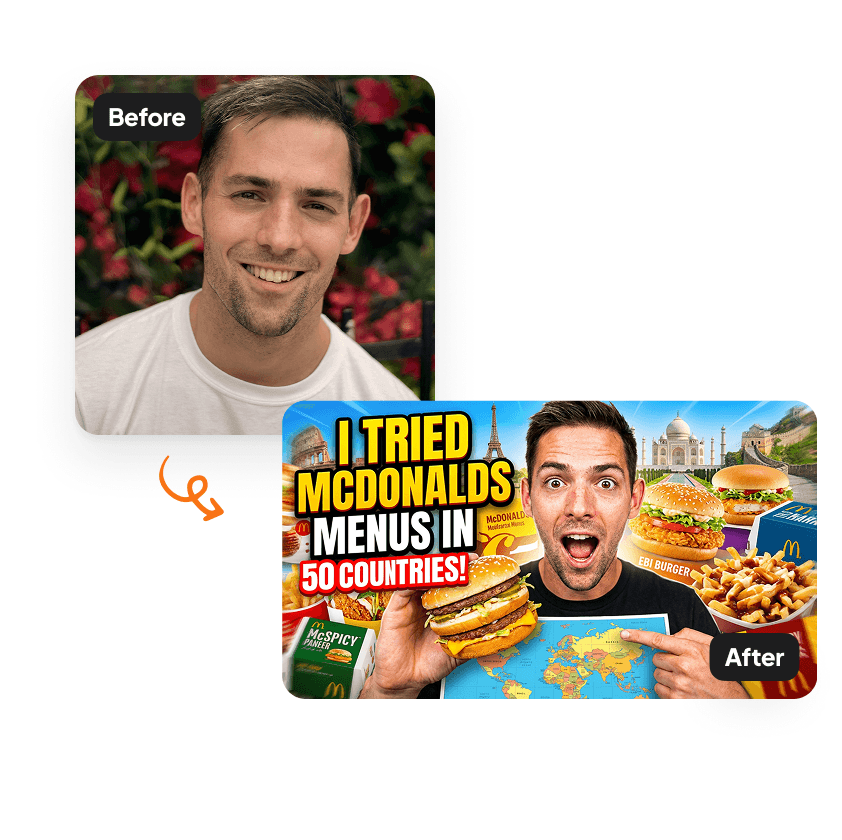
Upload one selfie and Aragon generates a polished YouTube thumbnail with you front and center, an eye-catching background, and clear caption space. Built for creators, free to try.
Click on one of these photos to try:




Before
After
Trusted by Industry Leaders. Millions of images edited to date.









How does it work?
1
Upload your image
Start with a clear photo of yourself. We support JPG, JPEG, PNG, and other common image formats.
2
Enter your caption
Add your caption text. The AI generates a bold, high-impact thumbnail automatically with expressive reactions, an eye-catching background, and a click-optimized layout.
3
Download your thumbnail
Your YouTube thumbnail is ready to download. Upload it directly to your video in YouTube Studio and start getting more clicks.
What makes it special?
Creator portrait, not stock illustration
Your selfie becomes the focal point of the thumbnail — not a stock image, not a text-prompt character. The thumbnail features you specifically, with your face front and center where viewers' eyes land first.

Backgrounds that match your video theme
Each thumbnail includes an AI-generated background tuned to the video's subject — gaming setups, vlog scenes, podcast studios, tutorial environments, reaction backgrounds, and more. The background reads as part of the thumbnail, not a sticker layer.

Built for 16:9 and Shorts
Output comes in YouTube's standard 1280×720 thumbnail size and also works for YouTube Shorts 9:16. Free credits come with every Aragon account, so you can test multiple thumbnail variations before publishing.
Discover more tools
Have a question? We're here to help
Customer satisfaction is our number one priority. Our live agents are available 7am - 11pm (PT), 5 days Sunday through Thursday.
The YouTube Thumbnail Generator is an AI tool that turns your photo into a bold, clickable thumbnail. Enter a caption and get an image with expressive reactions and eye-catching backgrounds designed to drive clicks.
Upload a photo, type your caption, and click Edit. Our AI generates a thumbnail with your face as the focal point, adjusting your expression and background to match the mood of your video.
The AI uses your caption to design the thumbnail's mood and expression. You can add text overlays later in your preferred editing tool, or use the generated image as-is.
Your thumbnail will appear in your dashboard within minutes and will be ready to download.
Explore our other AI Photo Editing Tools
Touch up your photos even further with our suite of photo editing tools and features
