





























































































































































































































































































































































The Leading AI Headshot Generator for Professionals
THE #1 RANKED AI PHOTO EDITOR
AI Testimonial Card Generator: Customer Quote Graphics
Turn a customer quote into a polished, on-brand testimonial card. Add a photo, your brand colors, and the quote — Aragon designs the graphic for your website, sales deck, or LinkedIn post. Free to try.
Click on one of these photos to try:



Trusted by Industry Leaders. Millions of images edited to date.









How does it work?
1
Add your photo
Drop a clear photo of the customer being quoted (or your own photo for self-testimonials). A front-facing photo with good lighting reads best on the card.
2
Enter the quote and your brand details
Paste the customer quote, add the customer's name, title, and company, and enter your brand colors. Aragon fits everything into a clean testimonial card layout.
3
Download your testimonial card
Your testimonial card appears in your dashboard, usually within minutes. Download in high resolution to add to your website, drop into a sales deck, share as a LinkedIn post, or use in email marketing.
What makes it special?
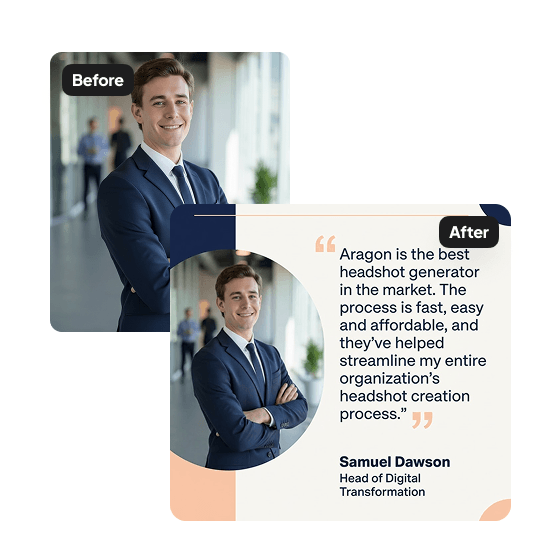
Designed for customer quotes, not generic captions
Each testimonial card features a clear quote layout, a circular photo frame for the customer, their name, title, and company, and brand-color accents. The layout is designed specifically for social proof — not a generic quote template.

Your brand colors, applied throughout
Add your company's brand colors and Aragon applies them consistently throughout the card — quote highlight, name accent, border treatment, background. The result reads as a piece of your brand collateral, not a stock template.

Built for B2B distribution channels
The output downloads in high resolution and is sized for the places customer testimonials actually get used — website landing pages, LinkedIn posts, sales deck slides, case study pages, email marketing assets, and proposal documents.
Discover more tools
Have a question? We're here to help
Customer satisfaction is our number one priority. Our live agents are available 7am - 11pm (PT), 5 days Sunday through Thursday.
The Testimonial Generator is an AI tool that creates professional testimonial cards from customer quotes. Upload a photo, add the quote and details, and get a shareable graphic in minutes.
Upload a photo, select your brand colors and font, choose an orientation, and fill in the quote, name, and role. Our AI generates a polished testimonial card with your details.
Customer testimonials, client quotes, employee endorsements, or any quote you want to highlight. The cards work great for websites, social media, pitch decks, and marketing materials.
Yes. You can select custom colors from a color wheel and add multiple brand colors to your card.
Your testimonial card will appear in your dashboard within minutes and will be ready to download.
Explore our other AI Photo Editing Tools
Touch up your photos even further with our suite of photo editing tools and features
