




























































































































































































































































































































































The Leading AI Headshot Generator for Professionals
THE #1 RANKED AI PHOTO EDITOR
AI Teeth Whitening Photo Editor: Brighten Your Smile in Any Photo
Whiten teeth in any photo without learning Photoshop. Upload a photo and Aragon brightens your smile in seconds, while keeping the rest of the photo untouched. Free to try.
Click on one of these photos to try:

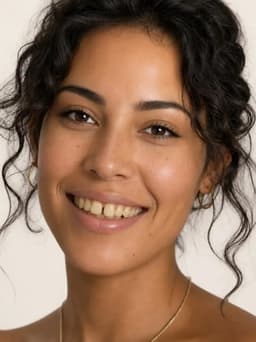


Before
After
Trusted by Industry Leaders. Millions of images edited to date.









How to whiten teeth in a photo
1
Upload your photo
Start with a clear, well-lit photo where the mouth is visible. Aragon works with common photo types and standard dimensions.
2
Apply AI teeth whitening
Aragon brightens the teeth in your photo while keeping skin tone, lips, and the rest of the photo unchanged.
3
Download your result
Your new photo is ready in your dashboard in seconds. Download in high resolution to share or save.
What makes it special?
BeforeAfterNo Photoshop or editing skills needed
Aragon replaces the manual retouching process entirely. Upload a photo and the edit happens automatically.
 Before
 After
AfterOnly the teeth change
Skin tone, lips, and the rest of the photo stay exactly as they were.
 Before
 After
AfterPart of Aragon's photo editing suite
Pair with the Blemish Remover or Hair Color Editor for a full portrait touch-up.
When should you use the AI Teeth Editor?
Use it to polish a profile photo, touch up an old picture, or skip the Photoshop tutorial.

Brighten your smile for a LinkedIn photo, dating profile, or professional headshot.
Have a question? We're here to help
Customer satisfaction is our number one priority. Our live agents are available 7am - 11pm (PT), 5 days Sunday through Thursday.
Aragon's AI Teeth Editor whitens the teeth in your photo, brightening them while keeping skin tone, lips, and the rest of the photo unchanged. It edits the photo only, not your actual teeth.
No. Aragon replaces the manual retouching process. Upload a photo and the AI handles the edit in seconds.
Yes. Upload any clear photo and Aragon adjusts the appearance of the teeth automatically, no separate app or editing software required.
You can choose to whiten your teeth, straighten your teeth, or both. You need to select at least one option to edit your photo.
Free credits come with every Aragon account, usable across this tool and the full photo editor suite. Paid plans add more credits for higher usage.
A clear, well-lit photo where the mouth is visible gives the most accurate result. Heavily obscured or low-resolution photos tend to produce less reliable results.
This tool works with one photo at a time. Upload the one you want to edit.
