20 Model Poses for Fashion Photos, Explained

The same outfit can look great in one photo and plain in the next, and most of the time the reason is the pose. When a model stands straight with stiff arms, the clothes look flat and boxy. When the model shifts their weight and turns a little, the outfit shows its real shape.
Models don't just know how to pose naturally. They learn a few simple habits, like putting their weight on one leg, angling their body away from the camera and keeping their hands relaxed. Once you know these habits, you can use them in any photoshoot.
This guide covers 20 model poses for fashion, catalog and online store photos. Each pose has easy steps, the outfits it suits and the most common mistake to avoid.
What Makes a Good Model Pose?
A good model pose makes the clothes look their best while keeping the body relaxed and natural. Photographers and stylists check for a handful of things before they take a single frame.
Weight on one leg. Standing evenly on both feet makes the body look flat and boxy. Shifting your weight to one leg creates a gentle curve through the hips and shoulders, and that curve gives clothes shape.
Space between the arms and body. Arms pressed against the sides hide the waist and make the upper body look wider. A small gap between the arm and the torso shows the true shape of a jacket or top.
Angles instead of flat-on positions. Turning the body 30 to 45 degrees away from the camera looks slimmer and more dynamic than a straight-on angle.
A long neck and a forward chin. Pushing the chin slightly forward and down removes shadows under the jaw and makes the neck look longer in photos.
Relaxed hands. Hands show tension faster than any other body part. Keep fingers loose and slightly apart, and give your hands a job, like holding a lapel or resting on a hip.
Standing Model Poses for Full-Length Photos
Most fashion and catalog sessions start with standing model poses. They show the full outfit from head to toe, so they work for dresses, suits, coats and complete looks.
1. The Classic Contrapposto
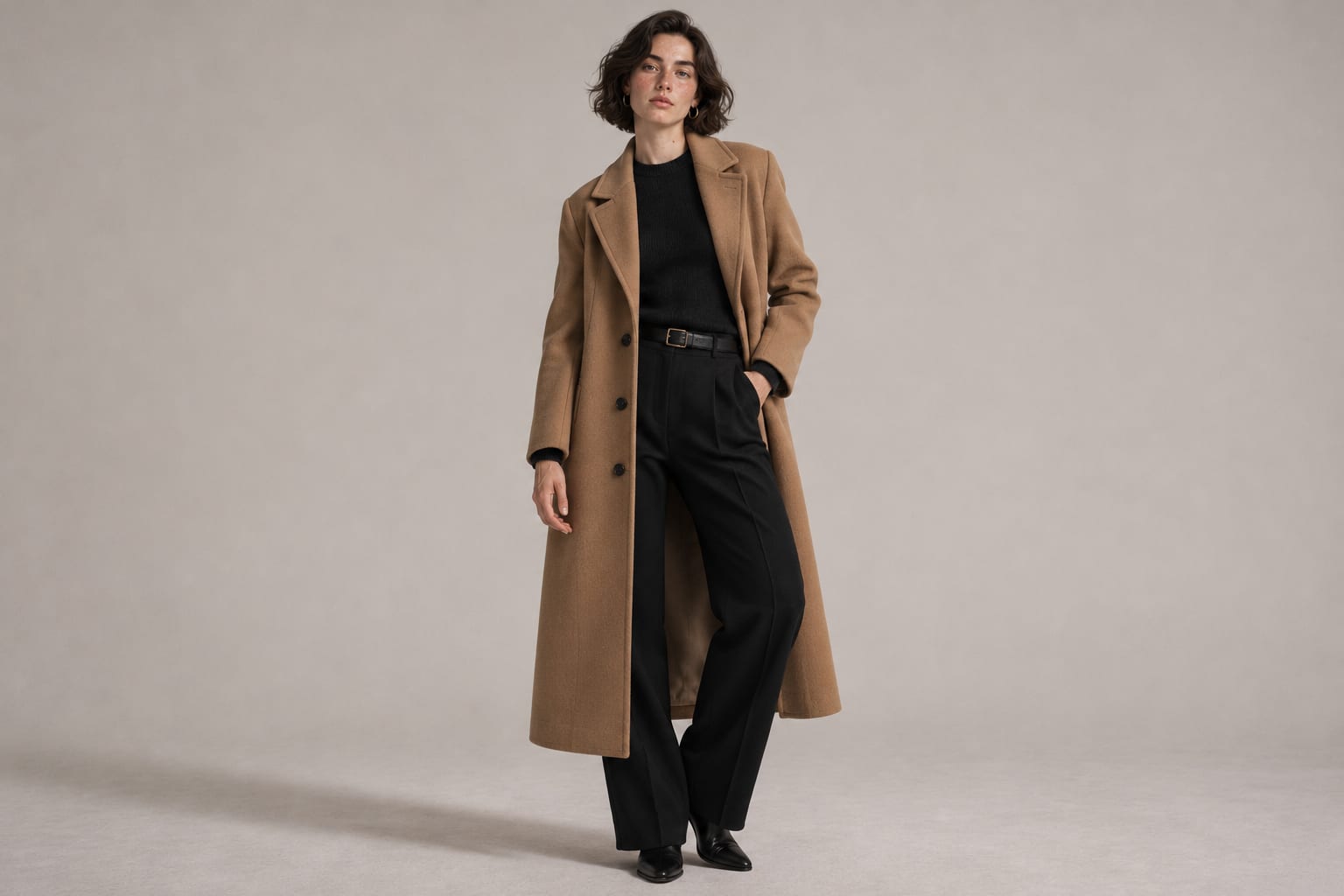
Put your weight on your back leg and bend your front knee slightly toward the other leg. Let your hips tilt naturally and relax your shoulders. This pose comes from classical sculpture, and it's still the most flattering standing position for almost any outfit.
Shows off. Dresses, trousers and full outfits.
Common mistake. Locking the back knee, which makes the whole body look stiff.
2. The Hand on Hip
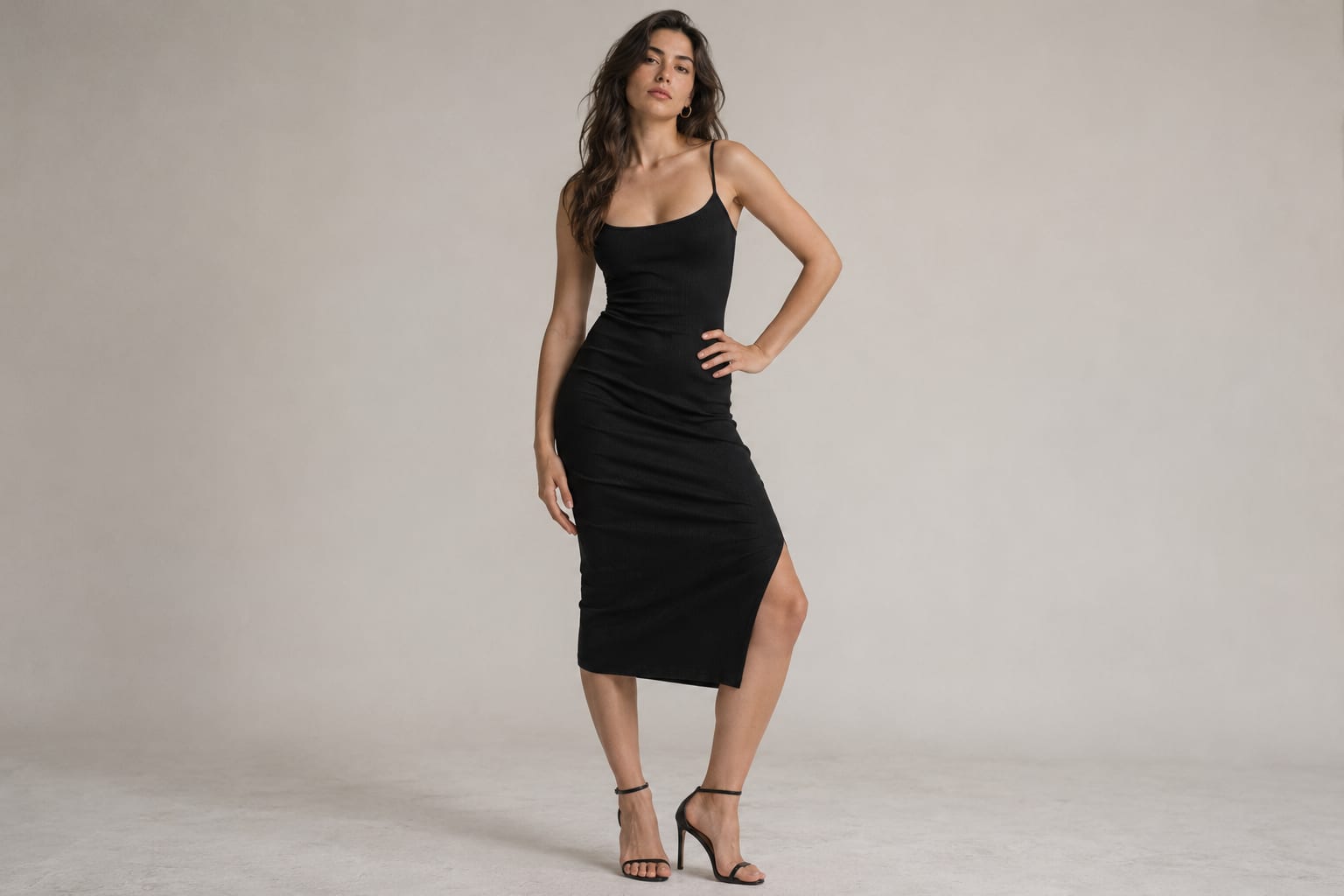
Stand at an angle to the camera and place one hand lightly on your hip, with the elbow pointing back rather than straight out to the side. Keep the other arm relaxed. The open space between the arm and the waist highlights the shape of the outfit.
Shows off. Fitted tops, belted dresses and tailored jackets.
Common mistake. Pressing the hand flat and hard against the hip, which bunches the fabric and looks forced.
3. The Crossed Legs Stand
Stand tall and cross one foot in front of the other at the ankle, with your weight on the back foot. This pose narrows the lower half of the body and adds a relaxed, confident feel.
Shows off. Skirts, wide-leg trousers and dresses.
Common mistake. Crossing at the knee instead of the ankle, which looks unbalanced.
4. The Over the Shoulder Look
Turn your back partly toward the camera, then look back over your shoulder toward the lens. Keep your chin close to your shoulder and let your weight rest on the leg farthest from the camera.
Shows off. Backless dresses, coats with interesting back details and long hairstyles.
Common mistake. Twisting the neck too far, which creates strain lines in the neck.
5. The Power Stance
Stand with your feet hip-width apart, shoulders back and chin level. Place your hands in your pockets or let them hang relaxed. This strong, symmetrical pose works well for menswear and business fashion.
Shows off. Suits, blazers and structured outerwear.
Common mistake. Standing completely straight with arms glued to the sides, which looks like a passport photo.
Model Poses That Show Fit and Fabric
Some poses exist mainly to show how clothes move and fit. These poses are especially useful for online stores, where shoppers can't touch the fabric.
6. The Fabric Pull
Gently hold the side of a skirt, dress or coat and pull it out slightly from your body. This shows the volume, weight and movement of the fabric.
Shows off. Flowing skirts, wide dresses and light coats.
Common mistake. Pulling too hard, which stretches the fabric and changes the true fit.
7. The Lapel Hold
Hold the lapel or collar of a jacket with one hand, as if adjusting the fit. Keep your fingers relaxed and your elbow slightly away from your body.
Shows off. Blazers, denim jackets and coats.
Common mistake. Gripping the lapel tightly, which creates wrinkles and tense knuckles.
8. The Side Profile
Turn fully sideways to the camera with your weight on the back leg. Lift your chin slightly and look straight ahead or off to the side. A clean side view shows the silhouette and how the garment falls from shoulder to hem.
Shows off. Fitted dresses, high-waisted trousers and the cut of a coat.
Common mistake. Slouching, which shows clearly from the side.
9. The Back View
Face away from the camera and turn your head slightly to the side so your profile is just visible. Keep your shoulders relaxed and your arms slightly away from your body.
Shows off. Back details, zippers, prints and the fit across the shoulders.
Common mistake. Letting your arms cover the back details you're trying to show.
Seated Model Poses
Seated poses feel relaxed and natural, and they show how clothes look in everyday life. Use a stool, a chair, steps or the floor.
10. The Stool Lean
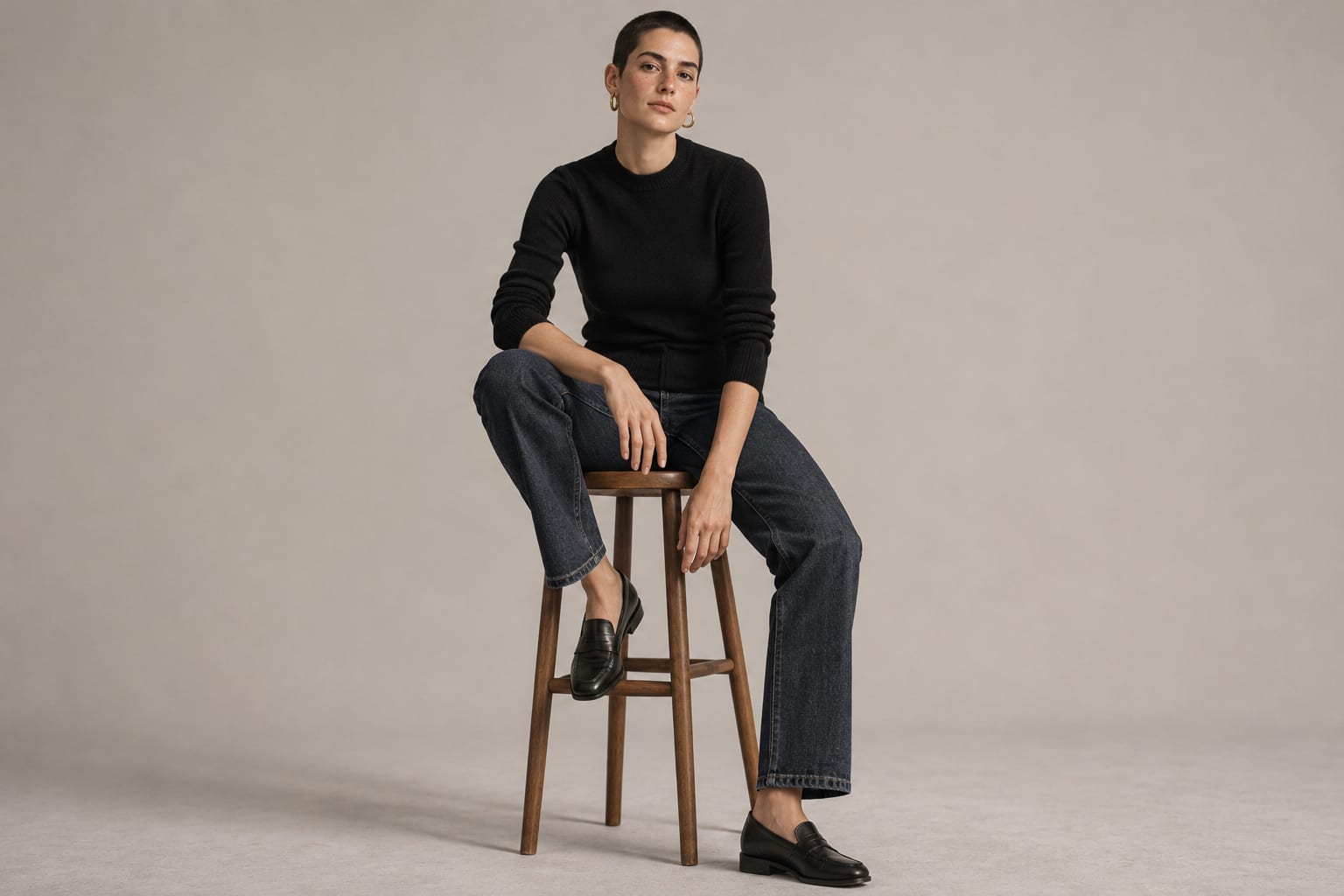
Sit on the front half of a tall stool with one foot on the footrest and the other leg extended toward the floor. Lean slightly forward and rest one hand on your knee.
Shows off. Jeans, trousers and casual looks.
Common mistake. Sitting all the way back on the stool, which makes the body look short and compressed.
11. The Floor Sit
Sit on the floor with your knees bent to one side and lean back on one hand. Keep your back straight and your chin forward.
Shows off. Long dresses, skirts and loungewear.
Common mistake. Pointing the knees straight at the camera, which makes the legs look shorter.
12. The Chair Turn
Sit sideways on a chair and turn your upper body toward the camera, with one arm resting on the back of the chair. This angle creates a natural twist through the body.
Shows off. Tops, sweaters and statement sleeves.
Common mistake. Leaning back too far, which bunches the fabric at the waist.
13. The Step Sit
Sit on a step with your feet on two different levels. This simple change in height adds shape to the legs and makes the pose look relaxed instead of posed.
Shows off. Sneakers, boots and casual outfits.
Common mistake. Placing both feet on the same step, which makes the legs look boxy.
Walking and Movement Model Poses
A walking pose shows how a garment swings, flows and moves with the body, which a static pose can't capture.
14. The Catwalk Step
Walk toward the camera, placing each foot directly in front of the other as if on a narrow line. Keep your shoulders back and your arms moving naturally. The photographer captures the moment your front heel touches the ground.
Shows off. Dresses, skirts and full-length coats.
Common mistake. Walking too quickly, which creates blur and awkward leg positions.
15. The Turn and Spin
Start facing away from the camera, then turn toward it in one smooth motion. Let skirts, coats and hair swing with the movement.
Shows off. Flowing dresses, pleated skirts and long coats.
Common mistake. Spinning too fast, which hides the outfit in a blur.
16. The Mid-Stride Look Away
Walk across the frame and look off to the side, away from the camera. The pose feels candid, like a street style photo.
Shows off. Streetwear, layered outfits and accessories.
Common mistake. Looking down at the ground, which hides the face and rounds the shoulders.
Hand and Arm Positions for Model Poses
Hands are the first place tension shows in a fashion photo. These positions give your hands a natural job and keep them relaxed.
17. The Hair Touch
Raise one hand and lightly touch your hair near your temple or the back of your head. Keep the elbow pointing up and away from the face to open up the upper body.
Shows off. Sleeveless tops, earrings and hairstyles.
Common mistake. Pressing the hand flat against the head, which looks posed.
18. The Pocket Thumb
Hook just your thumbs into your front pockets and let your fingers rest outside. This keeps the hands visible and relaxed while adding a casual, confident feel.
Shows off. Jeans, trousers and jackets with pockets.
Common mistake. Pushing the whole hand into the pocket, which hides the hands and bunches the fabric.
Model Poses for E-commerce Product Photos
Online stores need clean, consistent model poses that show the product clearly and keep attention on the clothes. Catalog shoots rely on these two.
19. The Straight-On Catalog Pose
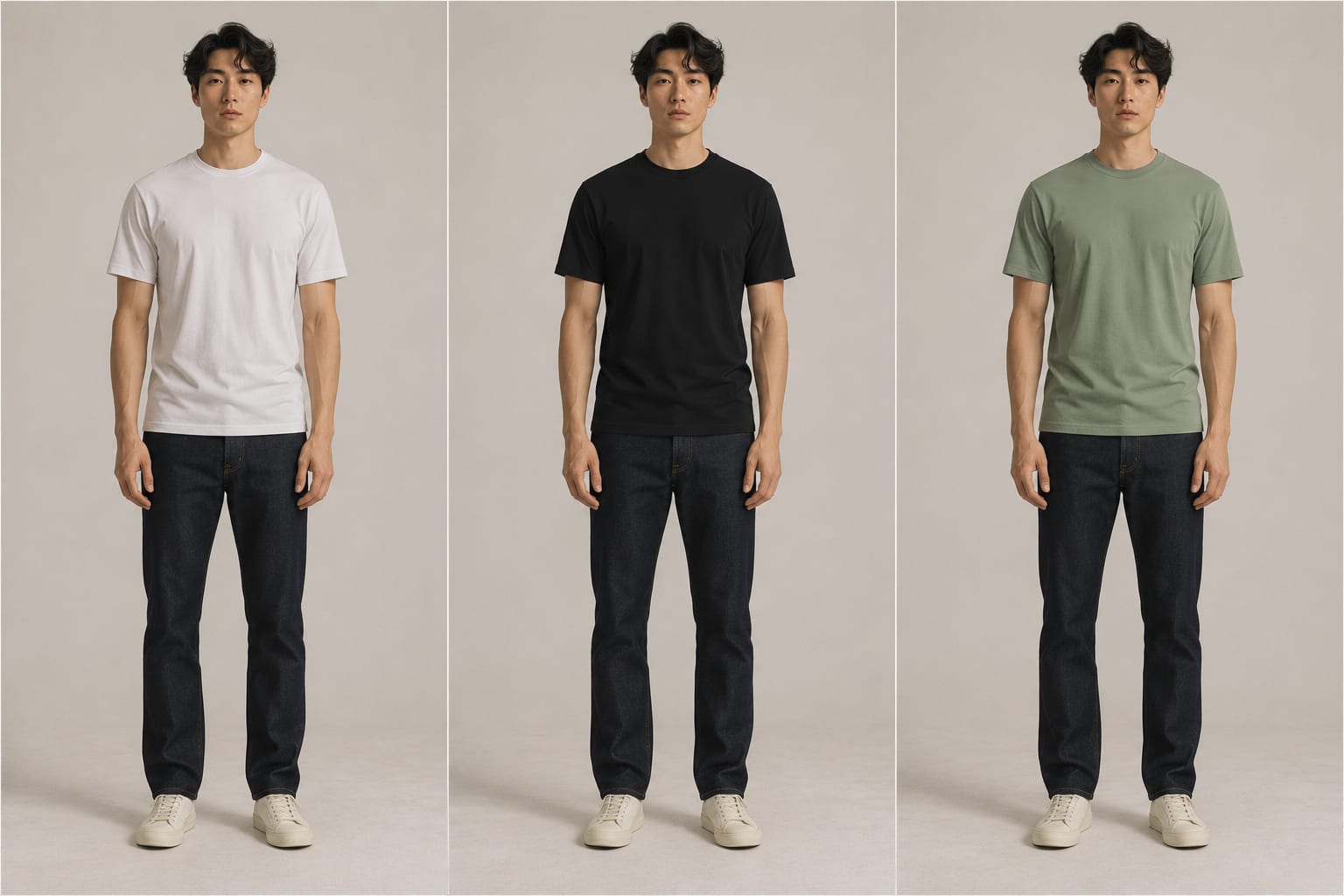
Face the camera directly, with your weight on one leg and your arms slightly away from your body. Keep your expression neutral and relaxed. This pose shows the front of the garment clearly and matches easily across a whole product page.
Shows off. Every product, especially basics like T-shirts, sweaters and jeans.
Common mistake. Changing the pose between products, which makes a product page look messy.
20. The Detail Close-Up
Frame the photo around one part of the outfit, like a pocket, a sleeve, a collar or a shoe. Use your hands to point toward or gently hold the detail.
Shows off. Buttons, stitching, fabric weave and accessories.
Common mistake. Leaving fingers in the frame without a purpose, which pulls attention away from the detail.
Common Posing Mistakes in Fashion Photos
Watch for these five habits during every session.
Standing square to the camera. Facing the lens straight on makes the body look wider. Turn 30 to 45 degrees for a slimmer, more natural shape.
Tense hands and fingers. Clenched fists and stiff, spread fingers show nerves. Keep the hands loose and give them something to hold.
Arms pressed to the body. Arms flat against the sides hide the waist and widen the upper body. Leave a small gap between the arms and the torso.
Looking down at the floor. A dropped chin creates shadows under the jaw and hides the face. Keep the chin forward and tilted slightly downward.
Holding a pose too long. Models look stiff when they freeze for too many frames. Move slightly between photos, shifting the weight, changing the hands or turning the head.
How to Fix a Model Pose After the Session
When a frame is almost right, these edits can save the shot.
Describe the fix. In Aragon's Quick Chat Editor, upload the photo and type what to change, like "straighten his collar and remove the clothing tag." Every edit stays in one conversation.
Fix a stiff stance. Aragon's Pose Editor changes a person's pose in a photo while keeping the face, clothes, lighting and background the same. Upload the photo, pick a new pose from the library or describe the one you want, and download the result.
Relax a forced expression. Aragon's Facial Expression Editor changes the expression on a face, so a tense look turns into a natural, relaxed smile.
Clean up the background. For product listings, Aragon's White Background tool places your model on a clean white background that matches most online stores. For other looks, Aragon's Background Changer swaps the background for a color, a scene or an image you upload.
Remove distractions. Aragon's Magic Eraser removes stands, cables, tags and other unwanted objects when you type what to erase, like "light stand" or "price tag."
Retouch the skin. Aragon's Blemish Remover clears spots and marks while keeping the skin looking natural.
Match the colors. Aragon's Color Correction tool balances brightness and color, so the clothes look the same across every photo on your product page.
Fit every format. Aragon's Image Extender adds space around a tight crop, so a full-length photo fits a wide website banner or a tall social post.
Add motion. Aragon's Image to Video tool turns a fashion photo into a short clip for social media. You describe the motion, like a slow turn or a coat swaying, choose a model and generate the video.
All of these tools come with one Aragon plan.
Start With Five Poses and Build From There
You don't need to learn all 20 model poses at once. Start with the classic contrapposto, the hand on hip, the side profile, the stool lean and the catwalk step, since those five cover most outfits and most sessions. Keep your weight on one leg, your hands relaxed and your chin forward, and every pose on this list gets easier.
If a frame is close, upload it to Aragon and describe the fix, like "relax her left hand" or "swap the background for plain white," or use the Pose Editor above.
Related Aragon Tools
- Photo Enhancer improves the overall clarity and quality of fashion and product photos.
- Image Upscaler enlarges photos for banners, lookbooks and prints.
Related Reading
- 25 Natural Couple Poses for Photos That Don't Look Staged
- Instagram Reel Size and Specs for 2026
- Best AI Photo Editors in 2026, Free and Paid
FAQs About Model Poses
What are the basic model poses?
The basic model poses are the contrapposto stand with weight on one leg, the hand on hip, the side profile, the over the shoulder look, the seated stool lean and the catwalk step, a walking pose. These six poses cover most fashion, catalog and portrait sessions.
How do models pose for photos?
Models shift their weight to one leg, angle the body 30 to 45 degrees from the camera, keep a small gap between the arms and the body, and push the chin slightly forward. They also move a little between every frame, so no single pose looks frozen.
What do models do with their hands?
Models give their hands a light job, like touching their hair, holding a lapel, resting on a hip or hooking a thumb in a pocket. The fingers stay loose and slightly apart, because clenched or stiff hands show tension in every photo.
What are good model poses for beginners?
Beginners should start with the contrapposto stand, the hand on hip and the stool lean. All three feel natural, work with almost any outfit and teach the basics of weight, angles and relaxed hands.
How do you pose for e-commerce photos?
Use a consistent straight-on pose with your weight on one leg and your arms slightly away from the body, so every product looks the same on the page. Add side, back and detail photos to show the fit, fabric and key features of each item.
How do you avoid looking stiff in fashion photos?
Keep moving slightly between frames, breathe out before each photo and relax your hands and shoulders. Changing your weight, the angle of your head or the position of one hand every few frames keeps every pose looking natural.