Best AI Photo Editors in 2026, Free and Paid

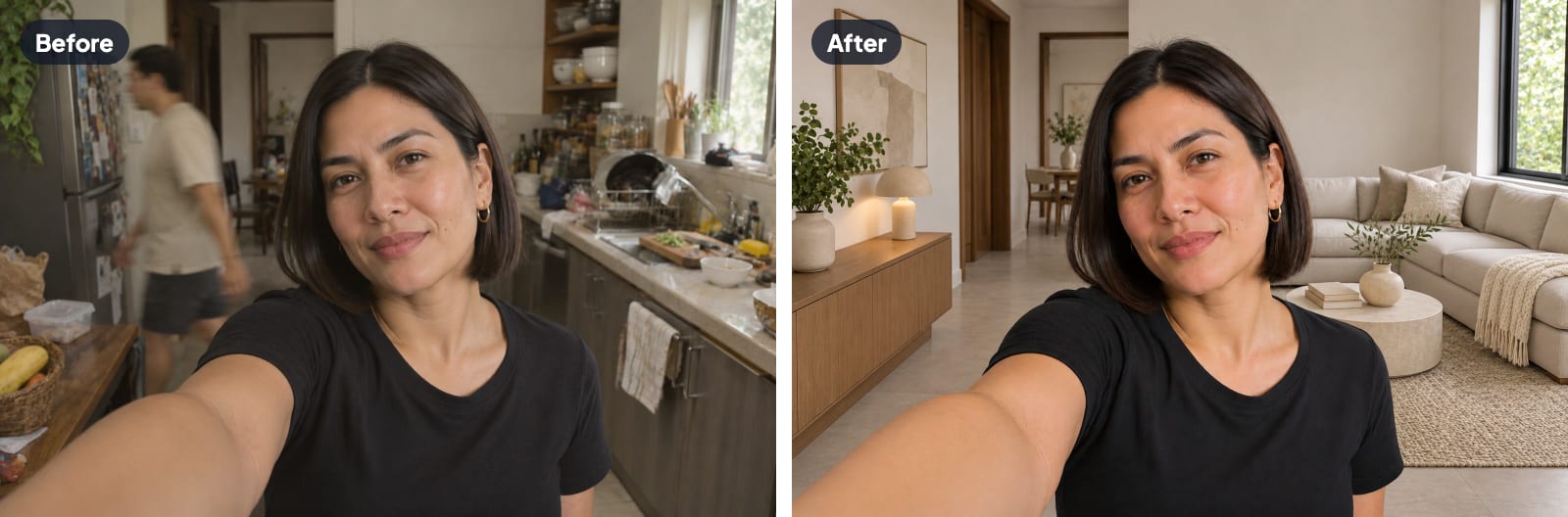
You take a great photo on vacation, and then you notice a stranger walking right behind you in the shot. A few years ago, fixing that meant opening Photoshop and spending an hour on one small fix. Now you can upload the photo to an AI photo editor, type "remove the person in the background," and get a clean photo back in a moment.
With so many options out there, finding the best AI photo editor is now the hard part. Some editors are great for product photos, some are made for quick fixes on your phone, and some are built for designers who want full control over every detail. If you pick the wrong one, you can end up paying for tools you never touch.
To make that choice easier, we compared nine popular AI photo editors. You'll see what each one does well, which ones you can use for free, and which type of user it fits. Our top pick is Aragon, because you can edit a photo just by telling it what to change in a chat, and you get top AI models like GPT Image and Nano Banana in one plan.
AI Photo Editors at a Glance
Plans and prices change often, so check each company's pricing page before you subscribe.
| Tool | Best for | Free option | Where it works |
|---|---|---|---|
| Aragon AI Photo Editor | Chat-based edits plus 100+ one-click tools, with top models on one plan | Free credits with an account | Web, mobile |
| Adobe Photoshop | Professional retouching and detailed control | Free trial | Desktop, web, mobile |
| Canva | Social media posts and marketing graphics | Free plan with limits | Web, desktop, mobile |
| Photoroom | Product photos for online stores | Free plan with limits | Web, mobile |
| Luminar Neo | Landscape and portrait photographers | Free trial | Desktop |
| Google Photos | Quick fixes on your phone | Free with monthly limits | Mobile, web |
| Picsart | Creative edits on mobile | Free plan with ads | Mobile, web |
| Pixlr | A free Photoshop-style editor in the browser | Free plan with limits | Web, mobile |
| Topaz Photo | Upscaling and sharpening | Free trial | Desktop |
How We Compared These AI Photo Editors
To find the right tool for different jobs, we reviewed the current version of each tool as of October 2026, along with official feature pages, plan details and independent reviews. Every tool was judged on the same 6 points.
- Edit quality. Does the result look natural, without blurry patches, odd shapes or strange colors?
- Ease of use. Can someone with zero editing experience get a good result in a few minutes?
- Range of AI tools. Does the editor cover backgrounds, retouching, object removal and upscaling, or just one of those jobs?
- Free access. What can you do without paying, and where are the limits?
- Speed. How long does a typical edit take from upload to download?
- Where it works. Is the tool available in a browser, on your phone or only on a desktop computer?
Did We Test These Editors Ourselves?
Not with scored tests yet. We haven't timed edits or graded results side by side, so the quality and speed notes in each entry come from each company's feature pages, help centers and plan details, along with independent reviews. We make Aragon, so we held it to the same six points as every other editor. Aragon's prices were checked on aragon.ai on November 13, 2026. Its limits sit in the same "Watch out for" line as every other editor's, and competitor plans are described by type rather than price, since those numbers change often.
The 9 Best AI Photo Editors in 2026
1. Aragon AI Photo Editor
The Aragon AI Photo Editor brings more than 100 single-purpose AI tools into one account. Instead of learning layers and masks, you either pick a tool for the job or open Aragon's Quick Chat Editor and describe the change, like "remove the person in the background" or "make the sky sunset orange." Every edit stays in one conversation, so you can keep refining. Every tool runs in your web browser, so there's nothing to install.
The range is the biggest strength. Aragon covers background changes, object and text removal, blemish removal, unblurring, upscaling, color correction, photo restoration, colorizing old black and white photos and image extending. Aragon's Photo Enhancer is a good place to start, because it improves the overall clarity and quality of almost any photo with a single pass.
Behind those tools are top image models like GPT Image 2.5, Nano Banana 2, Seedream and FLUX 2. They all come with one subscription, instead of separate ChatGPT and Google plans.
Best for. Anyone who wants to edit photos by describing the change, with 100+ ready-made tools for common jobs.
Watch out for. Aragon focuses on fast, guided AI edits, so designers who want layer-by-layer manual control will still reach for a traditional editor.
Price. Free credits come with your Aragon account. Paid plans start at $15 a month, and Aragon Pro ($29 a month) includes every model.
2. Adobe Photoshop
Photoshop is still the most powerful photo editor for professionals. Its Generative Fill and Generative Expand tools let you select an area, type what you want, and add, remove or extend parts of a photo. In 2026, Photoshop can run several AI models side by side, including Adobe's Firefly models and partner models from other companies.
Best for. Professional retouchers, designers and photographers who need precise, detailed control over every pixel.
Watch out for. Photoshop has a steep learning curve, and the full app requires a monthly subscription. Generative features use credits that run out on heavy use.
Price. A free trial is available, and Adobe offers several monthly plans.
3. Canva
Canva's Magic Studio adds AI photo tools to the popular design app, including background removal, magic erase and magic edit. Because everything lives inside Canva, you can edit a photo and drop it straight into an Instagram post, a flyer or a presentation.
Best for. Small businesses and social media managers who edit photos mainly to use them in designs.
Watch out for. The photo tools are good for quick fixes but lighter than dedicated editors, and many AI features sit behind the paid Canva Pro plan.
Price. A free plan is available, and Canva Pro gives you the full set of AI tools.
4. Photoroom
Photoroom is built for product photos. It removes backgrounds, places products on clean white or styled scenes, and adds realistic shadows, which makes it popular with online sellers who need dozens of matching catalog images.
Best for. E-commerce sellers and small brands creating product listings.
Watch out for. Photoroom is focused on products, so it's less useful for portraits, landscapes or restoring old photos. The free plan places limits on how many photos you can export.
Price. A free plan is available, and paid plans remove limits and add batch editing.
5. Luminar Neo
Luminar Neo from Skylum is a desktop photo editor built around AI tools for photographers. Its sky replacement, relighting and portrait features are favorites among landscape and travel photographers, and it also removes unwanted objects from a scene.
Best for. Photographers who edit on a computer and want strong AI tools without an Adobe subscription.
Watch out for. Luminar Neo runs on desktop computers, so you can't open it quickly in a browser on any device.
Price. A free trial is available, with subscription and one-time purchase options.
6. Google Photos
If you already use Google Photos, you have a capable AI editor on your phone. Magic Editor lets you move or remove objects and change the sky, while Magic Eraser and Unblur handle quick cleanups.
Best for. Everyday phone users who want fast fixes on photos already in their camera roll.
Watch out for. Free users get a limited number of Magic Editor saves each month, and the tools offer less control than a dedicated editor.
Price. Free with limits, and Google One plans raise those limits.
7. Picsart
Picsart is a mobile-first editor packed with creative effects, filters, stickers and AI tools for backgrounds, retouching and object removal. It's popular with creators who edit social content directly on their phones.
Best for. Creators who want playful, trendy edits on the go.
Watch out for. The free plan shows ads, and the busy interface can feel overwhelming for simple jobs.
Price. A free plan is available, and Picsart Pro removes ads and adds more AI tools.
8. Pixlr
Pixlr is a browser-based editor that looks and feels a lot like Photoshop, with layers plus AI tools such as generative fill, background removal and image generation. It's a good middle ground between simple apps and full professional software.
Best for. People who want a familiar, Photoshop-style editor in a browser without a big subscription.
Watch out for. The free plan limits AI use and shows ads.
Price. A free plan is available, and paid plans add more AI credits.
9. Topaz Photo
Topaz Photo specializes in making photos sharper, cleaner and larger. It's a favorite among photographers who need to rescue noisy low-light shots or enlarge images for big prints.
Best for. Photographers who need top-quality upscaling, sharpening and noise reduction.
Watch out for. Topaz focuses on image quality rather than creative edits, so it won't change backgrounds or remove objects.
Price. A free trial is available, with paid licenses for continued use.
What Is the Best Free AI Photo Editor?
The best free AI photo editor for most people is Aragon. Free credits come with your account, 100+ tools run in your browser, and you can make an edit just by describing the change in a chat.
Other free options suit different needs.
| Free option | What you get | Good to know |
|---|---|---|
| Aragon | 100+ AI editing tools in your browser, with free credits on sign-up | Paid plans add extra credits for regular editing |
| Google Photos | Magic Editor, Magic Eraser and Unblur on your phone | Limited Magic Editor saves each month |
| Canva | Basic AI photo tools inside a design app | Many AI features need Canva Pro |
| Pixlr | A Photoshop-style editor in your browser | Limited AI use and ads |
| Picsart | Creative effects and AI tools on mobile | Ads on the free plan |
| Photoroom | Background removal for product photos | Export limits on the free plan |
Yes, there is a free online AI photo editor for most jobs, and several work right in your browser. The main differences come down to how many tools you get, how many edits you can make, and whether the free plan adds ads or limits your downloads.
Top AI Photo Editor Picks for Each Job
Here's the best pick for the jobs people repeat most.
Best for Changing Backgrounds
Aragon's Background Changer replaces a photo's background with a solid color, a scenic option or an image you upload, and it can remove the background entirely for a transparent PNG. Photoroom is a strong pick for product-only catalogs.
Best for Removing Objects and People
Aragon's Magic Eraser removes unwanted objects and people when you type what to erase, like "person in the background" or "red trash can." On a phone, Google Photos Magic Editor handles quick removals in photos already in your camera roll. For captions and words on an image, Aragon's Text Remover clears the text and fills the space with matching background.
Best for Retouching Portraits
Aragon's Blemish Remover clears spots and marks while keeping skin natural. For bigger portrait changes, Aragon's Facial Expression Editor adjusts a facial expression, and Aragon's Pose Editor changes a person's pose while keeping the face, clothes and background the same. Photoshop is the pick for professionals who retouch skin by hand, layer by layer.
Best for Sharpening and Upscaling
Aragon's Unblur Image tool sharpens fuzzy faces and details, and Aragon's Image Upscaler enlarges photos for prints and banners. Topaz Photo is the pick for photographers who want maximum control over sharpening and noise.
Best for Fixing Old Photos
Aragon's Photo Restoration tool repairs scratches, creases, stains and faded color in old prints, and Aragon's Image Colorizer adds realistic color to black and white photos.
How to Choose the Best AI Photo Editor
Answer these five questions and the list gets short fast.
- What do you edit most often? Portraits, product photos, social posts and old family photos each favor different tools. Pick the editor that handles your most common job.
- How much editing experience do you have? If you've never used layers or masks, a guided AI editor like Aragon gets you better results faster than a professional app.
- Where do you edit? Browser tools work on any computer. Desktop apps like Luminar Neo and Topaz Photo need installing, and Google Photos and Picsart shine on phones.
- How often do you edit? Occasional edits fit comfortably inside a free plan. Weekly editing for a business usually justifies a paid plan.
- Do you need many tools or just one? If you'd otherwise pay for ChatGPT for chat edits and another app for upscaling, Aragon puts chat editing, 100+ tools and top models like GPT Image and Nano Banana on one plan.
Tips for Better Results With Any AI Photo Editor
These habits make AI edits look natural.
Start with the best file you have. Photos saved from messaging apps lose detail with every share. The original file from your camera or phone gives AI more detail for a clean edit.
Do one edit at a time. Change the background, then remove objects, then sharpen. Stacking several big changes in one step makes mistakes harder to spot.
Zoom in before you save. Check faces, hands, hair and text at full size, since those areas show AI mistakes most clearly.
Keep the original. Always save your edited photo as a new file so you can start over if you change your mind.
Edit in the right order. Fix damage and remove objects first, adjust color next, and upscale last, so you never enlarge a problem along with the photo.
Pick the Right Editor and Start Editing
Aragon is our top pick if you want to edit by chatting or with one-click tools, with top models on one plan. Photoshop leads for professional control, Canva for design work, Photoroom for product photos, Luminar Neo for photographers, and Google Photos for quick phone fixes.
Start with the free credits in your Aragon account. Upload a photo, type the change you want, and keep refining in the same chat until you're happy with the result.
Related Aragon Tools
- Color Correction fixes brightness, contrast and color balance automatically.
- Image Extender adds more space around a photo that was cropped too tightly.
Related Reading
- The Best AI Image Generator in 2026, 9 Top Tools Compared
- How to Remove a Watermark or Text From Your Photos
- How to Restore Old Photos With AI, From Scan to Print
FAQs About AI Photo Editors
What's the best AI photo editor available?
Our top pick is Aragon, because you can edit by describing the change in a chat or with 100+ one-click tools, using top models like GPT Image and Nano Banana on one plan.
Is there a free online AI photo editor?
Yes, several AI photo editors work free in your browser. Aragon gives you free credits with your account and access to a wide range of AI tools.
Where can I find a free AI photo editor?
Aragon works in any browser, and free credits come with your account. Google Photos is free on your phone, and Pixlr and Canva have free browser plans.
Can AI photo editors replace Photoshop?
For most everyday jobs, yes. AI photo editors now handle background changes, object removal, retouching and upscaling, without layers or masks.
Is AI photo editing safe for personal photos?
Safety varies by tool, so read the privacy policy before you upload. Check for clear information about how long photos are stored, whether they're used to train AI models, and how to delete your photos.
What's the easiest AI photo editor for beginners?
The easiest place to start is a chat-based editor. In Aragon's Quick Chat Editor, you upload a photo and type what you want, like "remove the background" or "fix the lighting," with no layers, masks or settings to learn.