Instagram Reel Size and Specs for 2026

Nothing is more frustrating than posting a Reel and seeing Instagram cut off the top of your video or hide your text behind the caption. Most of the time, the problem isn't your video. It's the size, or where you placed the text on the screen.
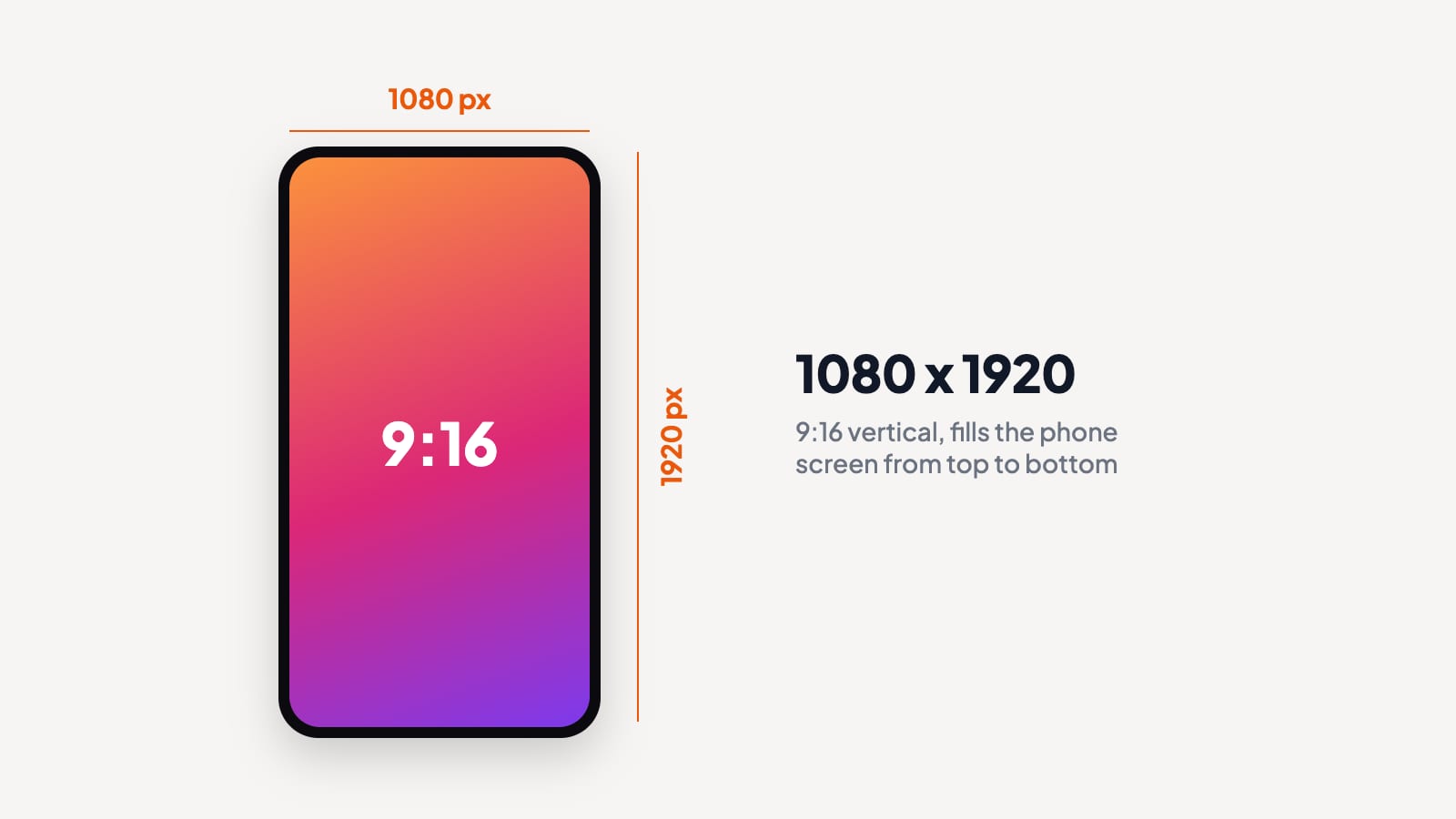
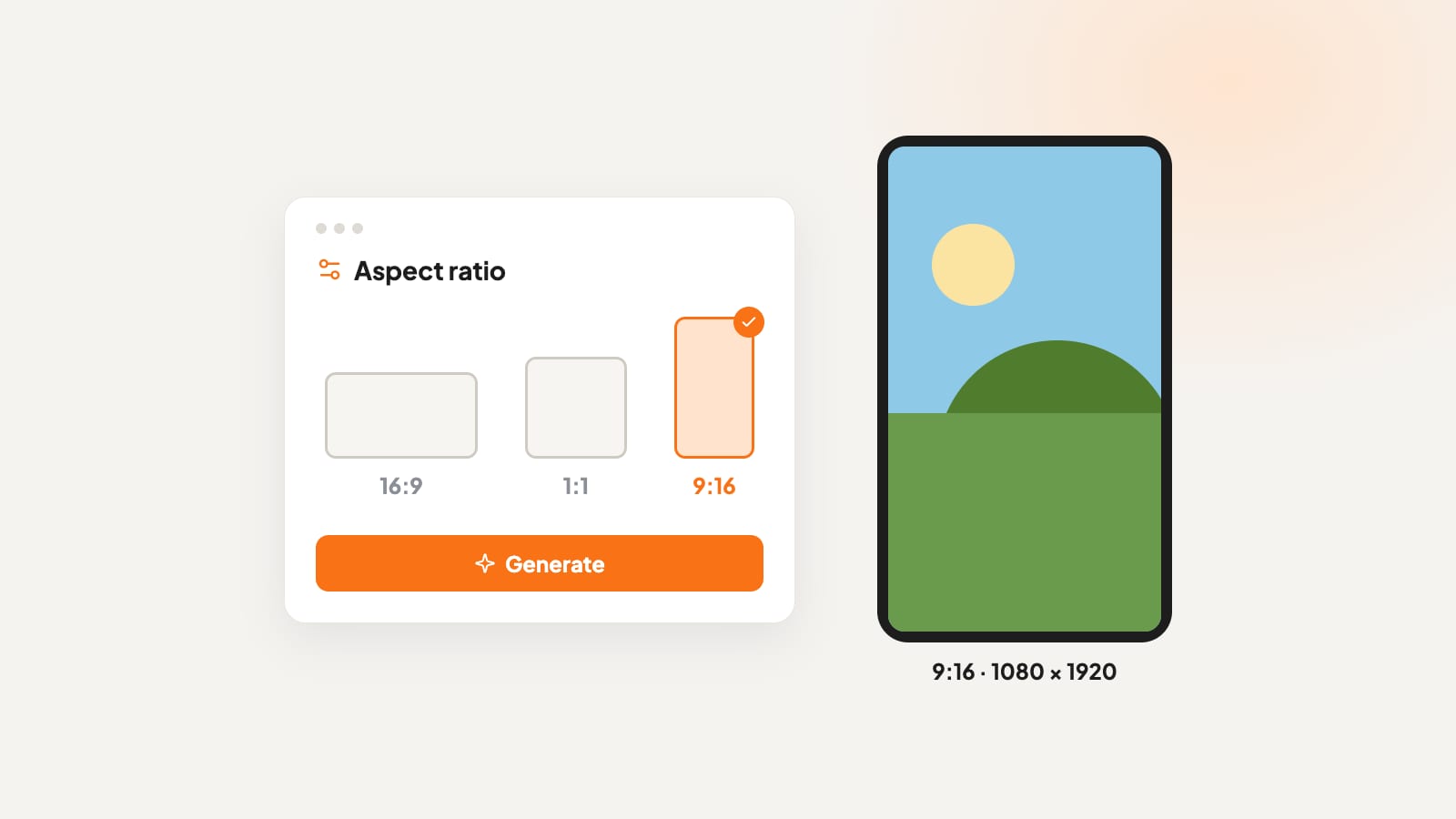
The best Instagram Reel size is 1080 x 1920 pixels, with a 9:16 aspect ratio. That's a tall, vertical video that fills the whole phone screen. But getting the size right is only one part of the job. Instagram also places buttons and your caption on top of the video, cuts your cover photo differently on your profile, and shows Reels longer than three minutes to fewer new viewers.
In this guide, you'll find every Reel spec you need for 2026, including safe zones for text, cover photo size, video length and export settings.
Instagram Reel Size at a Glance
Bookmark this table and check it before every upload. These specs were checked in October 2026, and Instagram updates them from time to time, so check the official pages before a big campaign.
| Spec | Recommended setting |
|---|---|
| Video size | 1080 x 1920 pixels |
| Aspect ratio | 9:16 (vertical) |
| Minimum resolution | 720 x 1280 pixels |
| File format | MP4 with H.264 video |
| Frame rate | 30 frames per second |
| Maximum length | Up to 20 minutes (3 minutes or less for reach) |
| Cover photo | 1080 x 1920 pixels, with key details in the middle 1080 x 1440 |
| Profile grid preview | 3:4, center crop |
| Safe zone | Leave the top 14%, bottom 35% and 6% on each side clear of text |
What Is the Instagram Reel Aspect Ratio?
The Instagram Reel aspect ratio is 9:16, which means the video is 9 units wide for every 16 units tall. That tall, narrow shape matches the screen of a phone held upright, so your Reel fills the whole display with no black bars.
Resolution is a separate idea. Aspect ratio describes the shape of the frame, while resolution describes how many pixels fill that shape. A 1080 x 1920 video and a 720 x 1280 video share the same 9:16 shape, but the 1080 version holds more detail and looks sharper on modern phones.
Instagram accepts other shapes too, like square or horizontal video, but those formats leave empty space on the screen. A horizontal video in the Reels feed looks small and loses attention quickly. A vertical 9:16 video fills the screen, which is what Reels is built for.
Instagram Reel Safe Zones for Text and Faces
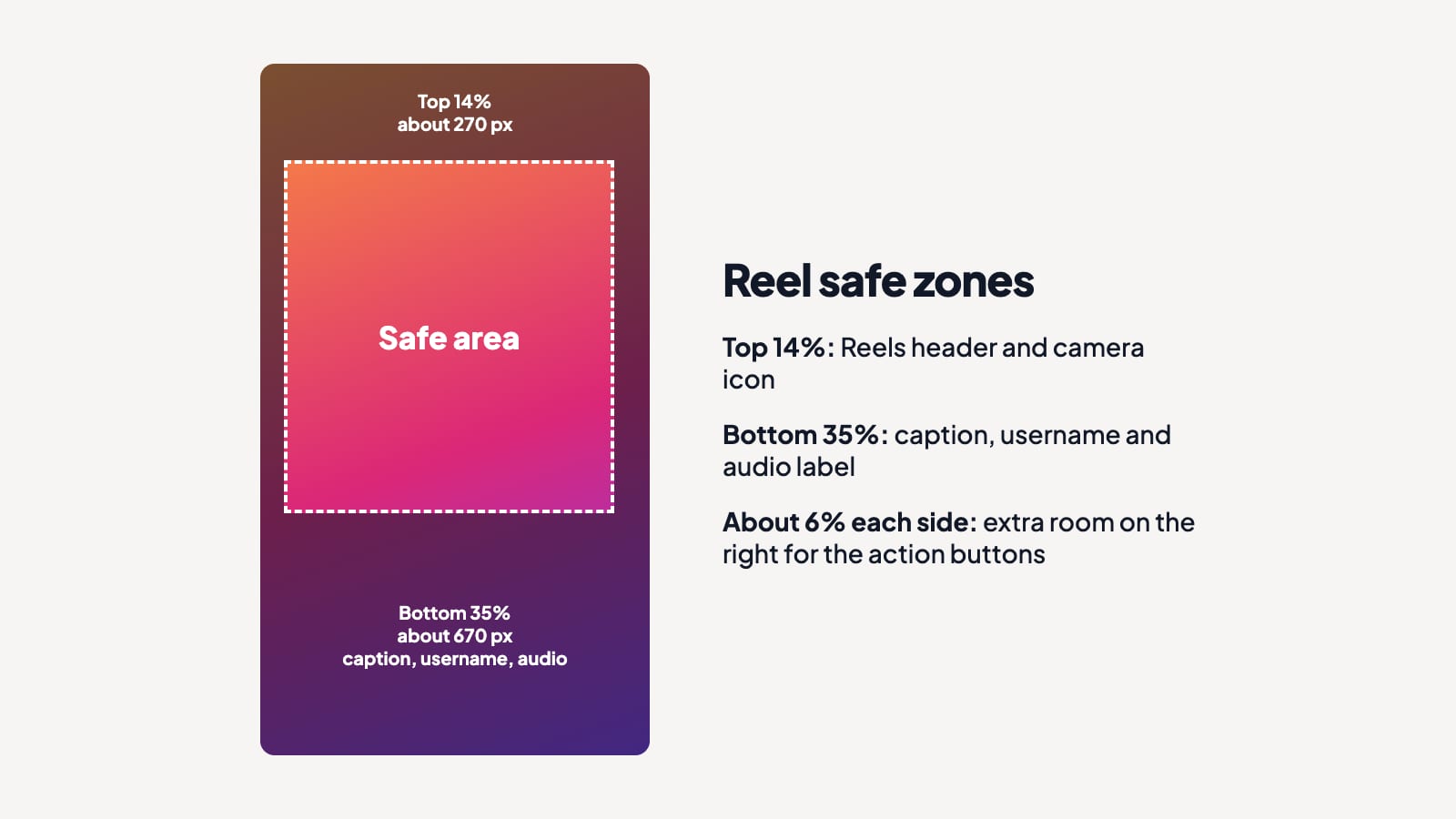
The full 1080 x 1920 frame is the size of your video, but people don't see all of it clearly. Instagram places buttons and text on top of your Reel, including your username and caption at the bottom, plus the like, comment and share icons on the right.
Meta's Ads Guide for Instagram Reels suggests keeping text, logos and faces away from these areas. Meta writes these margins for Reels ads, but the same buttons and caption sit on regular Reels, so they work as a safe guide for any post.
- Top 14% of the frame, about 270 pixels, where the Reels header and camera icon sit.
- Bottom 35% of the frame, about 670 pixels, where your caption, username and audio label appear.
- About 6% on each side, roughly 65 pixels, with extra room on the right for the action buttons.
That leaves a safe area of roughly 950 x 980 pixels in the middle of the frame. Put your headline, key product shots and anyone speaking to the camera inside that box, and nothing important gets hidden.
Bottom placement causes the most trouble. Many creators put subtitles or a "follow for more" message low in the frame because that spot feels natural, but that's exactly where Instagram stacks the caption. Move text up to the middle third of the screen, where nothing covers the words.
Instagram Reel Cover Photo Size
Your cover photo is the still image people see before they tap play. It shows up on your profile, in the Reels tab and in search, and each spot crops the image a little differently.
Design your cover at 1080 x 1920 pixels, the same size as the video. Instagram's Help Center lists a smaller recommended cover size of 420 x 654 pixels, but working at full size keeps the cover sharp on every screen.
Since January 2025, Instagram shows profile grids as tall 3:4 tiles instead of squares. Your 9:16 cover gets cropped to the middle 1080 x 1440 pixels on your grid, which cuts about 240 pixels from the top and another 240 from the bottom. Keep your title, face or product inside that middle area, and your cover looks complete everywhere it appears.
A strong cover works like a headline. Use 3 to 5 big, bold words, high contrast between the text and the background, and a clear face or product. If you're making covers from a horizontal photo, Aragon's Image Extender adds more space above and below the picture so it fits the tall 9:16 shape without awkward cropping.
How Long Can an Instagram Reel Be?
According to Instagram's Reels page, you can record and edit Reels up to 20 minutes long, using one clip or several clips that add up to that length. The longer limit is rolling out gradually, so some accounts may still see a 3-minute cap until the update arrives.
Instagram only shows Reels to new viewers when the video is 3 minutes long or shorter. Anything longer mostly reaches your current followers, so keep growth-focused Reels under 3 minutes and save longer videos for tutorials and deep dives your audience already wants.
For most accounts, short Reels still win. Videos between 15 and 90 seconds give you enough time to hook viewers, share one clear idea and end with a reason to follow, without losing people.
Best Export Settings for Instagram Reels
The right export settings keep your Reel sharp after Instagram compresses the file.
- Resolution. Export at 1080 x 1920. Larger files get scaled down anyway, and smaller ones look blurry on big phone screens.
- Format. Use MP4 with H.264 video and AAC audio, the most widely supported combination.
- Frame rate. Stick with 30 frames per second unless your footage was recorded at a different rate.
- Upload over Wi-Fi. Instagram may lower the upload quality on a slow mobile connection, so a strong Wi-Fi signal helps your Reel keep its detail.
- Check the app's quality setting. In Instagram's settings, turn on the option to upload at the highest quality so the app keeps as much detail as possible.
How to Make a Vertical Video in the Right Size
The easiest way to get the Instagram Reel size right is to create your video in 9:16 from the very first step. Cropping a horizontal video later cuts off the sides of every scene, and important details often end up outside the frame.
Aragon's Text to Video tool lets you choose 9:16 before you generate, so every clip arrives in the right vertical shape. Type a short idea, pick a model such as Kling, Veo or Seedance (all on one Aragon plan), choose the vertical format, then generate, edit and export your video as an MP4. Most models create clips at 720p to 1080p, and the built-in Upscale option takes select videos up to 4K for extra sharpness.
Depending on what you're starting with, a few other Aragon tools fit the job.
- Starting from a photo? Aragon's Image to Video tool turns one picture into a moving clip. You describe the motion, choose a model and pick the aspect ratio before you generate.
- Starting from a full script? Aragon's Script to Video tool creates matching scenes from your script, and most models support 9:16 for vertical Reels.
- Want Reel ideas and templates? Aragon's Instagram Reels Maker creates vertical 9:16 shorts and offers templates and hook ideas, and you export the finished video and post it to Instagram.
- Need to join clips into one Reel? Aragon's Merge Videos tool combines several clips into one video. Keep every clip in the same 9:16 shape for a clean result.
- Footage looks a bit rough? Aragon's Video Enhancer makes existing footage clearer and sharper before you upload.
You can explore every option in one place on the Aragon AI Video Generator page.
Common Instagram Reel Size Mistakes
These five habits cause most sizing problems.
Uploading horizontal video. A 16:9 video in the Reels feed looks tiny, with large empty bars above and below. Create or edit in 9:16 from the start.
Placing text at the very bottom. Captions and usernames cover the bottom third of the screen. Keep subtitles and messages in the middle of the frame.
Forgetting the profile grid crop. A cover title placed near the top or bottom disappears on your 3:4 grid. Keep cover text inside the middle 1080 x 1440 area.
Exporting at a low resolution. A 720p video stretched to fill a large phone screen looks blurry. Export at 1080 x 1920 whenever possible.
Cropping a finished horizontal video. Cutting a wide video down to vertical often slices people and products in half. Plan the vertical frame before you film or generate the video.
Get the Size Right Before You Post
The Instagram Reel size that works best in 2026 is 1080 x 1920 pixels at a 9:16 aspect ratio. Keep text inside the safe zone, design covers for the 3:4 grid, stay under 3 minutes when you want new viewers, and export as an MP4 at 30 frames per second.
Create your video in 9:16 from the start. With Aragon, you choose 9:16 before you generate, so your next Reel is ready to post.
Related Aragon Tools
- Promo Video creates short promo videos with a hook, an offer and a call to action.
- Image Upscaler enlarges a cover image so it stays sharp at 1080 x 1920.
Related Reading
- The Best AI Image Generator in 2026, 9 Top Tools Compared
- 25 Natural Couple Poses for Photos That Don't Look Staged
FAQs About Instagram Reel Size
What size is an Instagram Reel?
An Instagram Reel is 1080 x 1920 pixels, with a 9:16 vertical aspect ratio. That size fills a phone screen held upright, with no black bars above or below the video.
What is the aspect ratio for Instagram Reels?
The aspect ratio for Instagram Reels is 9:16. Instagram accepts other shapes, but anything wider than 9:16 leaves empty space on the screen and looks smaller in the Reels feed.
How long can an Instagram Reel be?
Instagram Reels can be up to 20 minutes long, though the longer limit is still reaching some accounts. Reels of 3 minutes or less have the best chance of being recommended to people who aren't following you.
What size should an Instagram Reel cover be?
Design your cover at 1080 x 1920 pixels. Your profile grid crops the cover to a 3:4 tile, so keep text and faces inside the middle 1080 x 1440 pixels.
Why does Instagram crop my Reel?
Instagram shows video that isn't 9:16 with empty space around it, and it crops covers to 3:4 on your profile grid. Create your video at 1080 x 1920 and keep important details in the center of the frame, so nothing gets cut from your cover.
Can I post a horizontal video as a Reel?
Yes, Instagram accepts horizontal video as a Reel, but it shows up small with empty space above and below. A vertical 9:16 version almost always gets more attention and longer watch time.