The Best AI Image Generator in 2026, 9 Top Tools Compared

Ask ten people for the best AI image generator and you'll hear ten different names. Most of those answers are fair, because each tool is strong at a different kind of image.
One tool writes "Grand Opening Saturday" on a bakery poster without a single typo, then hands you a portrait that looks like plastic. Another paints a gorgeous fantasy scene but can't spell a three-word sign. And a free plan that looks generous can make every image public, or block you from using it in a paid ad.
So instead of crowning one winner for everything, we looked at the nine AI image generators that matter in 2026 and asked a simpler question. Which one fits the job you actually do? Our quick picks come first, then a closer look at what each tool does well, where it falls short and what its free plan includes. And if you'd rather not pay for three separate apps, we'll show you where GPT Image, Nano Banana and FLUX all run on one subscription.
Quick picks
- Best overall. Aragon gives you 15 top models and chat-based editing on one plan.
- Best for chat edits if you already pay for ChatGPT. ChatGPT Images 2.5 lets you make and edit images in the same chat.
- Best for text in images. Ideogram spells the words on posters and logos correctly more often than most tools.
- Best for artistic style. Midjourney gives concept art and editorial images a distinct, polished look.
- Best free option. Gemini offers a free daily allowance on Nano Banana 2.
- Best for vectors and logos. Recraft creates true SVG files that scale to any size.
- Best for local control. FLUX.2 has open-weight models you can download and run on your computer.
Best AI Image Generators at a Glance
Prices and plans change often, so check each company's pricing page before you subscribe.
| Tool | Best for | Free option | Paid plans |
|---|---|---|---|
| Aragon AI Image Generator | 15 top models (GPT Image, Nano Banana, FLUX, Seedream) on one plan, with chat-based editing | Free credits with your account | From $15 a month, and Pro ($29) includes every model |
| ChatGPT Images 2.5 | Chat-based edits and text in images | Yes, with usage limits | From $20 a month (ChatGPT Plus) |
| Gemini (Nano Banana 2) | Free daily image creation | Yes, daily allowance | Google AI plans |
| Midjourney V8.2 | Artistic, stylish images | No | From $10 a month |
| Ideogram | Posters, logos and text in images | Yes, public and slow | Paid plans available |
| Adobe Firefly | Commercial projects and brand safety | Yes, limited | From $9.99 a month |
| Recraft | Vector graphics, icons and logos | Yes, public and non-commercial | Paid plans available |
| Bing Image Creator | Free images with a Microsoft account | Yes | Higher limits with Microsoft 365 |
| FLUX.2 | Running a model on your own computer | Open weights for some models | Pay per image through the API |
How We Compared These AI Image Generators
To find the best image generation AI for different jobs, we reviewed the current version of each tool as of October 2026, along with official pricing pages, plan terms and public image leaderboards. Every tool was judged on the same seven points.
- Image quality. Does the image look clean and believable, without extra fingers, melted faces or warped objects?
- Prompt following. Does the tool deliver what you asked for, including the number of objects, their colors and their positions?
- Text in images. Can it spell words correctly on signs, posters and labels?
- Editing. Can you change one part of an image without starting over?
- Free access. What can you do without paying, and what's the catch?
- Price. How much does regular use cost?
- Commercial rights. Can you use the images in ads, products and client work?
Did We Test These Tools Ourselves?
Not with scored, side-by-side tests yet. Most facts here come from the companies themselves, through pricing pages, plan terms, help centers and release notes, plus a few news reports linked in the entries where a company hadn't published the details. That means no tool in this guide "won" a test. The picks reflect what each tool publishes about its features, limits and prices. We make Aragon, so we held it to the same seven points as everyone else, and its limits sit in the same "Watch out for" line as every other tool's. Aragon's prices and model list were checked on aragon.ai on November 13, 2026, and other prices on each company's pricing page in November 2026.
The 9 Best AI Image Generators in 2026
1. Aragon AI Image Generator
The Aragon AI Image Generator puts 15 AI image models in one prompt box, including OpenAI's GPT Image 2.5, Google's Nano Banana 2, FLUX 2, Seedream, Grok Imagine and Qwen Image. You write a prompt, pick a model, choose an aspect ratio and get up to four versions of your image. Wrong spelling on a poster? Switch models and run the same prompt again, without opening another app or paying for another subscription.
You can also edit by chatting. With Aragon's Quick Chat Editor, you upload a photo or keep working on an image you just made, then describe the change in plain words, like "make the background a beach at sunset" or "remove the logo from the mug." Every edit stays in one conversation, so you can keep refining the image in the same chat. GPT Image 2.5 is Aragon's default chat model.
The same account includes more than 100 AI photo editing tools for upscaling, erasing objects and extending backgrounds, plus the Aragon AI headshot generator and AI video models like Kling and Veo for animating the result. And if you'd like to appear in the picture rather than a made-up scene, Aragon's AI Photo Generator creates themed photos of you from your uploaded pictures.
Best for. Anyone who wants several top image models, and a way to edit the results, on one subscription instead of three.
Watch out for. With 15 models in one place, it helps to try the same prompt on two or three models to find the one you like best for each kind of image.
Price. Free credits come with your Aragon account. Paid plans start at $15 a month, and Aragon Pro ($29 a month) gives full access to every image model plus AI video.
2. ChatGPT Images 2.5
OpenAI released ChatGPT Images 2.5 on September 8, 2026, and rolled it out to every ChatGPT plan, including the free one. The update brought faster generation, more natural images, and comment-style edits that change only the area you select.
ChatGPT's real strength is conversation. You describe an image, look at the result and ask for changes in plain language, such as "make the sky warmer" or "move the logo to the left."
Best for. People who already pay for ChatGPT and want to make and edit images in the same chat.
Watch out for. OpenAI doesn't publish a fixed number of free images, and free users hit limits faster than paid users.
Price. Free with limits. ChatGPT Plus costs $20 a month.
3. Gemini With Nano Banana 2
Google's image model, Nano Banana 2, is built into the free Gemini app on the web, Android and iPhone. Google began rolling out an update, Nano Banana 2.1, in early October 2026 with better image quality and stronger character consistency across edits.
Gemini is excellent at keeping the same person or product looking consistent across several images, which helps with storyboards and product series. If you'd rather use Nano Banana 2 alongside GPT Image and FLUX on one plan, it's also one of the models inside Aragon.
Best for. People who want strong free image creation every day.
Watch out for. Free images download at 1K resolution and carry a visible watermark that's on by default but can be turned off, along with Google's invisible SynthID mark that stays with your image. The higher-end Nano Banana Pro model requires a paid Google AI plan.
Price. Free daily allowance. Google AI plans raise the limits.
4. Midjourney V8.2
Many artists and designers pick Midjourney because its images have a distinct, polished look without much prompting. Version 8.2 became the default model on July 24, 2026, with bolder style, native 2K images and better personalization that learns your taste over time.
Midjourney works on its own website and in Discord. It also turns images into short video clips.
Best for. Concept art, mood boards, fashion and editorial visuals, and anyone who cares most about style.
Watch out for. Midjourney has no free plan and no free trial. Images are public by default, and private Stealth Mode starts with the $60 Pro plan. Long text inside images is still a weak spot.
Price. Plans run from $10 to $120 a month.
5. Ideogram
Ideogram is known for getting text right inside images. Posters, logos, packaging, signs and social graphics come out with readable, correctly spelled words far more often than with most tools. Ideogram 4.0 arrived on June 3, 2026, as the company's first open-weight model, with native 2K images, transparent backgrounds and layout control. Version 4.5 followed on September 30, 2026.
Best for. Posters, event flyers, logos, thumbnails and any design where the words matter.
Watch out for. Free-plan images are public and generate slowly, one at a time. Photorealistic scenes with lots of people are less consistent than with the top general tools.
Price. Free plan available. Paid plans add private images and faster generation.
6. Adobe Firefly
Adobe Firefly is the safe choice for business use. Adobe trained Firefly on licensed Adobe Stock images, openly licensed content and public domain material. According to Adobe's generative credits FAQ, outputs from features outside beta can be used in commercial projects.
Firefly Image 5 is the latest Adobe model, and Firefly connects directly with Photoshop, Illustrator and Adobe Express.
Best for. Agencies, brands and businesses that need images with clear commercial rights.
Watch out for. The free tier is small. Strict safety filters sometimes block harmless prompts, and the style is more conservative than Midjourney's.
Price. Free tier available. Firefly Standard starts at $9.99 a month.
7. Recraft
Recraft is the tool for designers who need vector files. Its V4.1 model, released in May 2026, creates true SVG files with real, editable paths, ready to open in Figma or Illustrator. Most AI tools only make flat pixel images, which blur when you scale them up.
Best for. Logos, icons, illustrations, brand assets and website graphics.
Watch out for. Images made on the free plan are public, belong to Recraft and can't be used commercially. Any client or brand work needs a paid plan from day one.
Price. Free plan available. Paid plans add private, commercial images.
8. Bing Image Creator
Bing Image Creator is Microsoft's free image tool, available at Bing and inside Copilot. It needs only a personal Microsoft account, with no credit card. As of mid-2026, Bing Image Creator runs entirely on Microsoft's own MAI-Image-2.5 model.
You get a daily allowance of fast images, then slower ones once those run out.
Best for. Casual users who want free images without another subscription.
Watch out for. It has fewer editing controls than ChatGPT or Gemini, and speeds drop after your fast images are used.
Price. Free. Microsoft 365 plans raise the limits inside Copilot.
9. FLUX.2
FLUX.2 from Black Forest Labs is the pick for technical users who want control. Some FLUX.2 models have open weights, which means you can download them and run them on your own computer. According to Black Forest Labs' documentation, the FLUX.2 [klein] 4B model uses the Apache 2.0 license, which allows commercial use. The larger [klein] 9B and [dev] models use a non-commercial license.
Best for. Developers, tinkerers and teams that want private, local image generation or custom training.
Watch out for. Running the bigger models takes a powerful graphics card and some technical setup. The most capable versions, [pro] and [max], run through a paid API. If you don't want to set anything up, FLUX 2, FLUX 2 Pro and FLUX 2 Max also run inside Aragon.
Price. Free to run the open models on your computer. API use is paid per image.
What Is the Best Free AI Image Generator?
For the most free daily images, Gemini is our pick, with a daily allowance on Nano Banana 2. For business images, Aragon is a strong free choice. Free credits come with your Aragon account, and free users work in the same generator as paid users, with models like GPT Image 2 and FLUX 2. You can also enlarge, edit and extend each image with Aragon's editing tools in the same account.
Other free options suit different needs. Bing Image Creator offers free images to anyone with a Microsoft account. Each free plan comes with its own limits, so compare them before you choose.
| Free option | What you get | Good to know |
|---|---|---|
| Aragon | Models like GPT Image 2 and FLUX 2, plus editing tools, with free credits on sign-up | Aragon Pro includes all 15 models |
| Gemini | Daily allowance on Nano Banana 2 | 1K downloads, visible watermark on by default (can be turned off) |
| Bing Image Creator | Daily fast images, then slower ones | Fewer editing controls |
| ChatGPT | Images 2.5, the same model as paid plans | Tighter limits with no published number |
| Ideogram | Strong text in images | Public images and slow generation |
| Adobe Firefly | Commercially safe model | A small allowance |
| Recraft | Vector and raster images | Public images with no commercial rights |
If you plan to use free images for a business, read the plan terms first. Several free plans make images public or limit commercial use, and that matters more than image quality once a client or customer sees the result.
How to Choose the Best AI Image Generator for Your Work
Pick by the job you do most often.
- For social posts and marketing images, use Aragon. Try the same prompt on GPT Image 2.5 and Nano Banana 2, keep the better result, then fix details by chatting in the Quick Chat Editor.
- For posters, flyers and anything with words, start with Ideogram or ChatGPT, since both spell text reliably.
- For logos and icons, use Recraft, because vector files scale cleanly to any size.
- For artistic style and mood, Midjourney still leads.
- For client and brand work, check commercial rights first. Adobe Firefly and paid plans on most tools give you clear usage rights.
- For free daily use, Gemini and Bing Image Creator give you the most without paying.
- For privacy, avoid free plans that make images public, or run an open model like FLUX.2 on your own computer.
- For people who don't want to pay for three apps, Aragon gives you GPT Image, Nano Banana and FLUX on one plan, so you can pick the best model for each job without stacking subscriptions.
How to Write Better Prompts for Any AI Image Generator
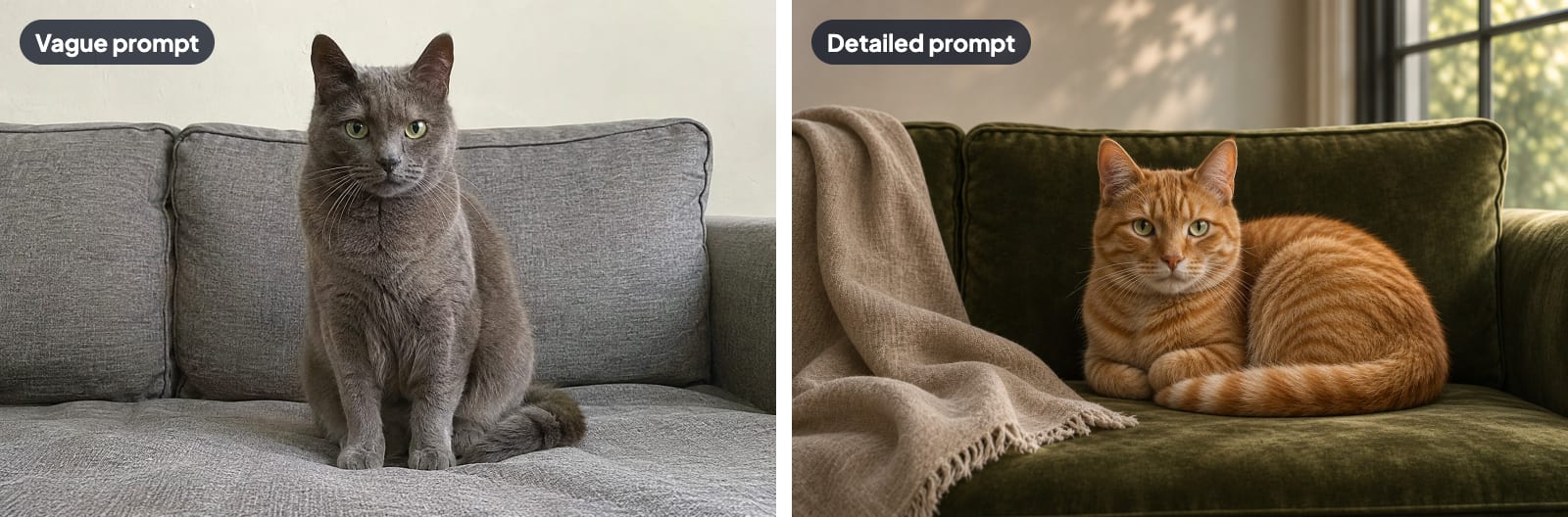
A vague prompt gets a generic image from even the best AI image generator, so give every prompt five parts.
- Subject. Who or what is in the image? "A golden retriever puppy" beats "a dog."
- Setting. Where is the subject? "Sitting on a porch swing at a lake house."
- Style. Should the image look like a photo, a watercolor, a 3D render or a flat illustration?
- Light and mood. "Soft morning light, calm and cozy" changes the whole feel.
- Framing. Close-up, wide shot or overhead? Add the shape you need, like square for Instagram or wide for a website banner.
Put together, a strong prompt reads like this. "A golden retriever puppy sitting on a porch swing at a lake house, realistic photo, early morning light, calm and cozy mood, close-up shot, square format."
A few habits improve results on every tool.
- Change one thing at a time when an image is close but not right.
- Put any text in quotation marks so the tool knows the exact words to write.
- Describe what you want, not what you don't want. Most tools handle "an empty beach" better than "a beach with no people."
Can You Use AI-Generated Images Commercially?
Usually yes, but it depends on the tool and your plan.
A few patterns hold across the tools in this guide. Free plans often come with limits on rights or privacy. Recraft's free-plan images can't be used commercially, and Ideogram's and Midjourney's lower tiers make images public. Paid plans generally grant commercial use. Adobe Firefly goes a step further by training only on licensed and public domain content.
Before you use an AI image in an ad, on a product or for a client, read the current terms for your tool and plan. Avoid prompts that copy a living artist's style by name, real people's faces without permission, or trademarked characters and logos. Rules on AI images are still changing, so check with a legal professional for high-stakes commercial work.
How to Finish and Improve AI Images With Aragon
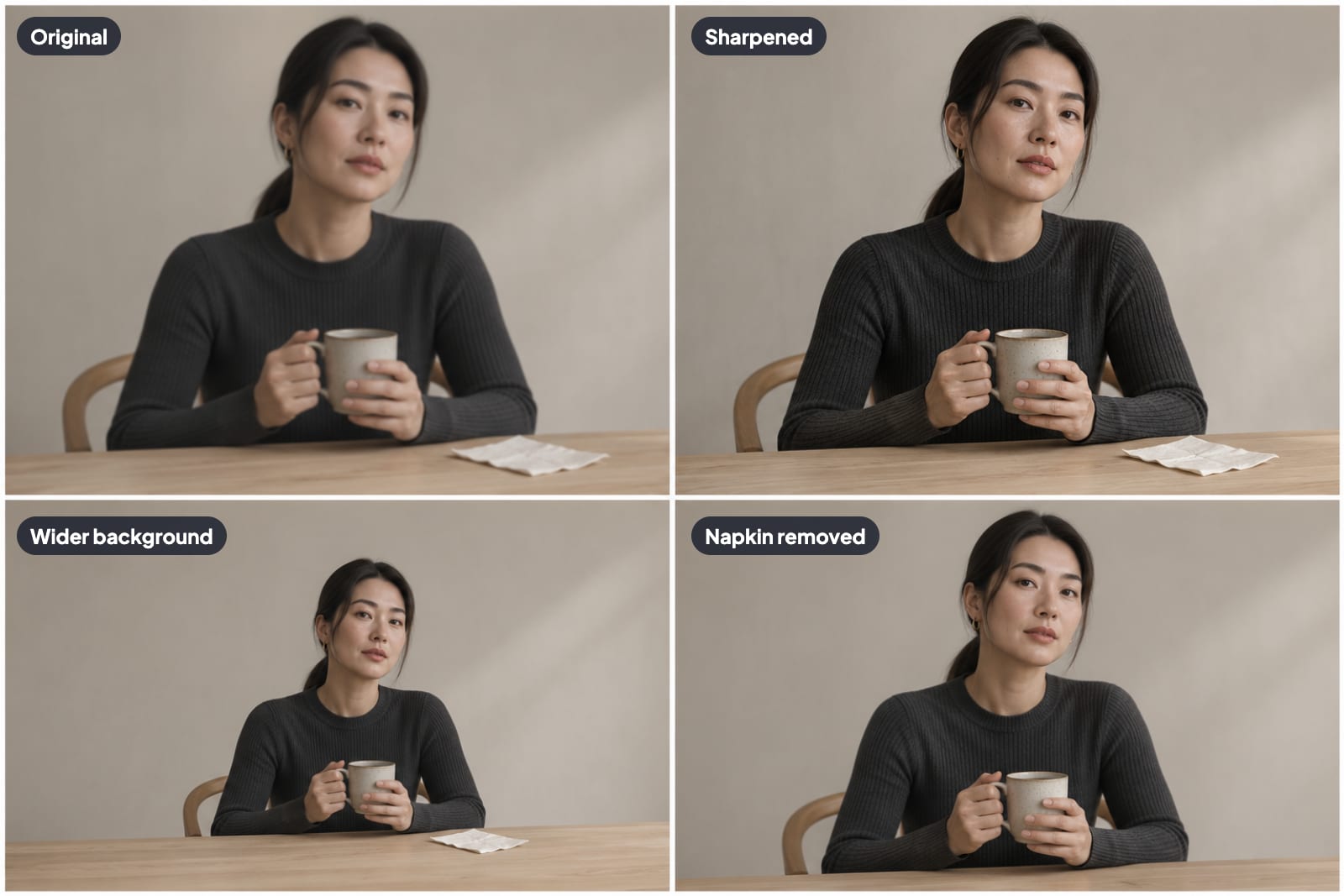
Most generated images need a small fix before they go live. In Aragon, you just ask. Open the image in the Quick Chat Editor and type the change, like "remove the sign behind her" or "make it look like golden hour." For precise jobs, these four tools do the work.
- Make it bigger. Aragon's Image Upscaler enlarges an image so it holds up on a website banner or in print.
- Remove a stray object. Aragon's Magic Eraser erases an extra hand, a random sign or a distracting shape with a quick brush.
- Change the shape. Aragon's Image Extender adds more background around an image, so a square image fits a wide banner without awkward cropping.
- Add motion. Aragon's Image to Video tool turns a still image into a short video clip. You describe the motion you want, choose a model and generate the clip.
Find the Best AI Image Generator for You
Aragon leads if you want 15 top models and chat-based editing on one subscription. ChatGPT suits people already paying for it, Midjourney for artistic style, Ideogram for text, Adobe Firefly for commercial safety, Recraft for vectors and FLUX.2 for local control. Gemini and Bing Image Creator give you the most free images.
If you want to create images and polish them in one place, start with Aragon. Write a five-part prompt, compare two models side by side, then edit the winner by chatting.
Related Aragon Tools
- Photo Enhancer sharpens and improves the overall quality of any image.
- Unblur Image fixes fuzzy faces and blurry edges in generated or real photos.
Related Reading
FAQs About AI Image Generators
What is the best AI image generator in 2026?
Our top pick is Aragon, because one subscription gives you 15 image models, including GPT Image 2.5, Nano Banana 2 and FLUX 2, plus chat-based editing. ChatGPT Images 2.5 is strong for chat-based edits and text, Midjourney leads for artistic style, Ideogram for text-heavy designs and Adobe Firefly for commercial safety.
What is the best free AI image generator?
Gemini gives the most free daily use through Nano Banana 2, and Bing Image Creator is free with a Microsoft account. Free credits come with your Aragon account. You can spend them on models like GPT Image 2 and FLUX 2, and on the editing tools that finish each image.
Can I use GPT Image, Nano Banana and FLUX with one subscription?
Yes. Aragon includes GPT Image 2.5, Nano Banana 2, FLUX 2, Seedream, Grok Imagine and Qwen Image in one prompt box. Paid plans start at $15 a month, and Aragon Pro includes every model.
Can I edit AI images by chatting, like in ChatGPT?
Yes. ChatGPT, Gemini and Aragon all let you describe changes in plain language. In Aragon, the Quick Chat Editor keeps every edit in one conversation, and it works on photos you upload as well as images you generate.
Which AI image generator is best for text in images?
Ideogram and ChatGPT Images 2.5 are the most reliable for spelling words correctly on posters, signs and logos. Put the exact text in quotation marks in your prompt for the best results.
Is Midjourney free?
No. Midjourney has no free plan and no free trial on its website or in Discord. Plans start at $10 a month.
Do AI-generated images have watermarks?
Some do. Gemini adds a visible watermark to free images by default, which you can turn off, and its invisible SynthID mark always stays. Many tools also attach hidden content labels that identify an image as AI-made, even when you can't see any mark.
Can I use AI images for my business?
On most paid plans, yes. Free plans are a different story, since some don't allow commercial use and others make your images public. Always read the terms for your specific tool and plan before using an image in ads, products or client work.
What is a good AI image generator for beginners?
ChatGPT and Gemini are the easiest starting points, because you describe the image in plain language and ask for changes the same way. Aragon works the same way. You type a prompt, then ask for changes in plain words in the Quick Chat Editor, and every edit stays in one conversation.
Which AI image generator makes the most realistic photos?
ChatGPT Images 2.5 and Gemini's Nano Banana 2 both produce highly realistic photos in 2026. Specific prompts help any tool look more real, so describe the lighting, camera angle and setting in detail.